I’ve been shadowbanned for now – don’t know if it’s a glitch, don’t know if it’s something else. I’m currently using the workaround @sabrecmc is using of hiding my blog until this problem works itself.
You won’t be able to see that blog’s posts from the notification link if you are subscribed, or if you go on surfacage.net directly. The last post is the Willow ask from a earlier this week.
Essentially you would only be able to see posts if you scroll through your dashboard and somehow catch my post. There’s a good chance a lot of people won’t be able to see this post even.
It’s called a shadow ban because you won’t have any idea your posts don’t show up unless you check directly or people message you.
I’ll be messaging staff and see if this is a bug or something. I hope it’s just a bug.
There’s a fix for this, it’s annoying but worked for me – go to settings, click on the blog you want to make visible again, and activate “hide username.tumblr.com” down at the bottom. It makes your blog show up in dash by default instead of as a separate page, but new posts show up at least.
I couldn’t see new posts on my blog outside tumblr either. I did the hide thing as well and can see my blog in the dash as well.
So, uh, a couple days ago Tumblr announced that starting on December 17, no NSFW visual content will be allowed on Tumblr anymore. This is a problem for a lot of different groups of people who like to use Tumblr, and it’s a problem for fandom because, y’know, sometimes fandom likes to create art of their favorite characters getting it on.
Tumblr is currently in the process of auto-flagging existing adult content, sometimes with hilariously wrong results.
So, basically, a lot of fandom is backing their stuff up, saving all their favorite dirty pictures, and leaving Tumblr en masse for greener, more porn-filled pastures.
There’s no consensus yet exactly on where people are going, because there never is when these things happen to fandom. People seem to be making more of an effort to put their stuff on AO3. Some people who do fandom on Twitter already are staying on Twitter. A bunch of people are joining various fannish Discord servers; if you like Steve/Tony, the 18+ 616 server is here for you, as is the 18+ MCU server and the all-ages server.
The two primary sites of refuge so far seem to be Pillowfort and Dreamwidth, both of which have pros and cons.
Pillowfort is currently in beta, and a key to create an account costs $5, although they are planning on being free at some point and monetizing via selling paid features later. If you’re coming from Tumblr, they are probably going to look more similar to it than any of your other options are. They have reblogging, global tags, blacklisting, and a lot of neat features. They say that they “plan to allow NSFW content with very few restrictions” which does sound better than Tumblr. The downside is that they clearly weren’t prepared to have this happen to them at this point; their site is very laggy and they haven’t even let in the next batch of users yet. There are also a bunch of things summed up in this Twitter thread that are kind of concerning – they need to change their domain name soon because their registrar technically won’t let them host NSFW works, they are not GDPR-compliant (which as I understand it means that they should legally not be operating in Europe), they don’t have a clear policy for when they will TOS you off the site, should it come to that, and they take money via PayPal which is gonna be a problem if PayPal ever finds out they host adult content. Basically, they have promise, but they are definitely a work in progress.
(Also I find their site design really hard to read.)
Dreamwidth is a fandom-created code fork of LiveJournal that’s been running for about a decade, since the time when LiveJournal started kicking fandom off because they posted adult content. (This is not a new problem for fandom.) They are very fandom-friendly, and they are very clear about what is allowed there, and they say that basically everything allowed under US law is legal, and your NSFW content is absolutely okay. (An account is free, but you can pay for more features, and they use a payment processor that does accept adult sites, so they’re cool there.) The downside is that, well, it’s a LJ clone, and if you’re coming from Tumblr it’s not the same paradigm of interaction as Tumblr – there are no global tags, no reblogging, and their imagehosting is very basic (but it does exist). Essentially you interact with people by reading their posts and commenting on them, and if you’re used to a site where you can just reblog stuff you like… that’s not DW. Having said that, I still really like DW, and I’m still there, posting frequently, and if you want to do Steve/Tony fandom the Cap/Iron Man community is there.
This is not the first time this has happened to fandom! We’re all gonna be out there somewhere! Just probably not here. It’s gonna be okay. We’ll find each other somehow.
MY NEW MONITOR HAS ARRIVED!!!!!! *in happy tears* (though the browser display is in a strange wider size huh I need some time to solve it) But then I am sick and my head and waist hurts ; m ;
I need my fair share of Stony fluff!!!
(And I am still not yet decided what I should do when Tumblr’s policy changes and seems many people are planning to leave… ; m ; )
In case you’re not aware, Tumblr has recently announced that on the seventeenth of December they’ll start purging all porn and porn-adjacent content on Tumblr. Why does that matter to LWU, you ask? Well, they’re using their bots to identify it, and we’ve all seen how well THAT works. One of my Wander posts even got flagged as sensitive for no apparent reason. What I want to do is reassure you all that I’ve taken steps to back up all of the content on LWU to my hard drive using a tool I was recommended a couple weeks ago. I’m going to continue to do so on a regular basis just in case, so there’s very little chance that my stuff will be lost.
I’m using this one! It condensed my entire blog as of November 20th into one 4.36 gigabyte folder.
Any notes on how to use it? I can’t figure it out.
Okay, so here’s how to do this.
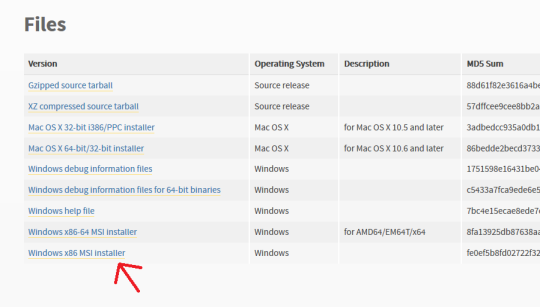
First off, go here and make sure you have Python installed. For Windows it should be the very bottom link, the x86 MSI Installer. You don’t have to do anything but install it.
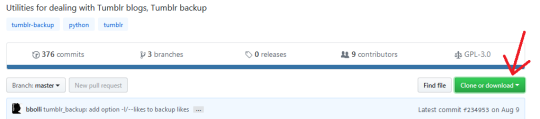
Second, go here, and click “Clone or Download” (the green button on the right). Select “Download ZIP”.
Make sure you have WinRAR or 7zip or something installed that lets you extract zip files.
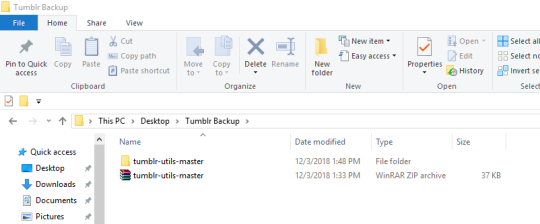
Next, make a folder on your desktop. I named mine “Tumblr Backup”, and in the following instructions I’m going to assume that’s what you’ve named yours as well; replace “Tumblr Backup” with whatever you name yours if it isn’t.
Drop the zip file you downloaded into Tumblr Backup. Go in and extract it; this should create a folder called “tumblr-utils-master“.
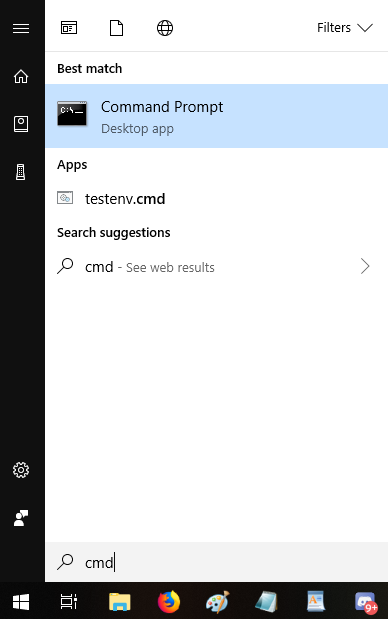
Open your Command Prompt. If you don’t know how to find that, click your start menu button and type “CMD”, which should give you this:
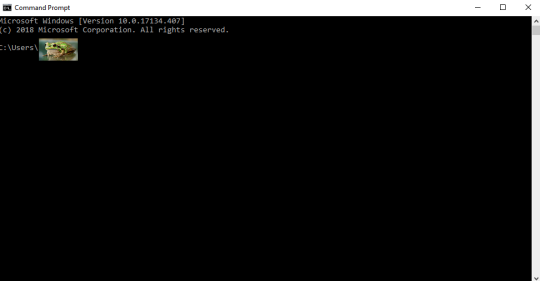
That should open this:
That frog over there is blotting out my profile name on my computer. Whatever your profile name is when you sign in (e.g. “Max” or “Snugglebuns” or “froglord69”) is going to be in that spot on the address path. If it instead says something about Windows and System 32, that’s okay, what I’m gonna tell you to do will go to the right place either way.
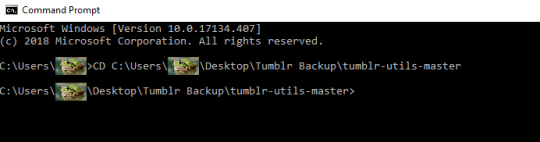
Next, input this command–keeping in mind that the parts in bold should be changed based on your profile name and what you named the folder on your desktop:
CD C:Usersfroglord69DesktopTumblr Backuptumblr-utils-master
There! Now you’re in the right folder! Next, enter this command, replacing the bolded bit with your own blog name:
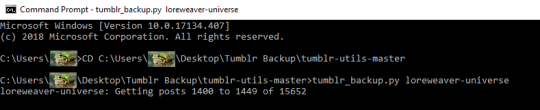
tumblr_backup.py yourblogname
You should see this:
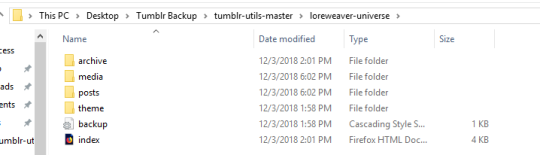
Then just…let it run! It took less than five minutes for my computer, though it will vary by processor and connection. Once it’s done, you’ll have something like this:
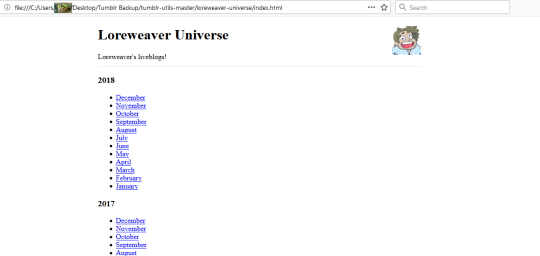
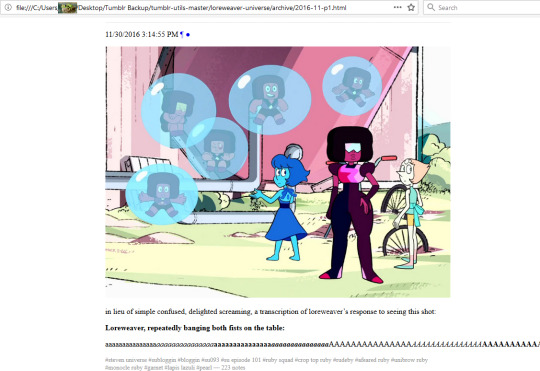
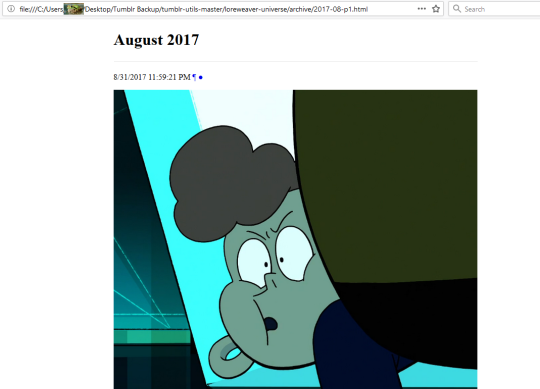
That “index” opens in an internet browser. It’s basically a webpage stored directly on your computer. Some pics of mine:
So…not pretty, but it’ll save the content of your posts. Hope this helps!








 Captain Neverever